



What is ToolHive?
ToolHive is an enterprise-grade open source (Apache 2.0) platform for running and managing Model Context Protocol (MCP) servers.
Follow the getting started guide to install ToolHive locally and run your first MCP server.
To learn more about the Model Context Protocol, see our MCP primer.
ToolHive components
ToolHive includes everything you need to use MCP servers in production. It's made up of four key components: the Runtime, Registry Server, Gateway, and Portal.
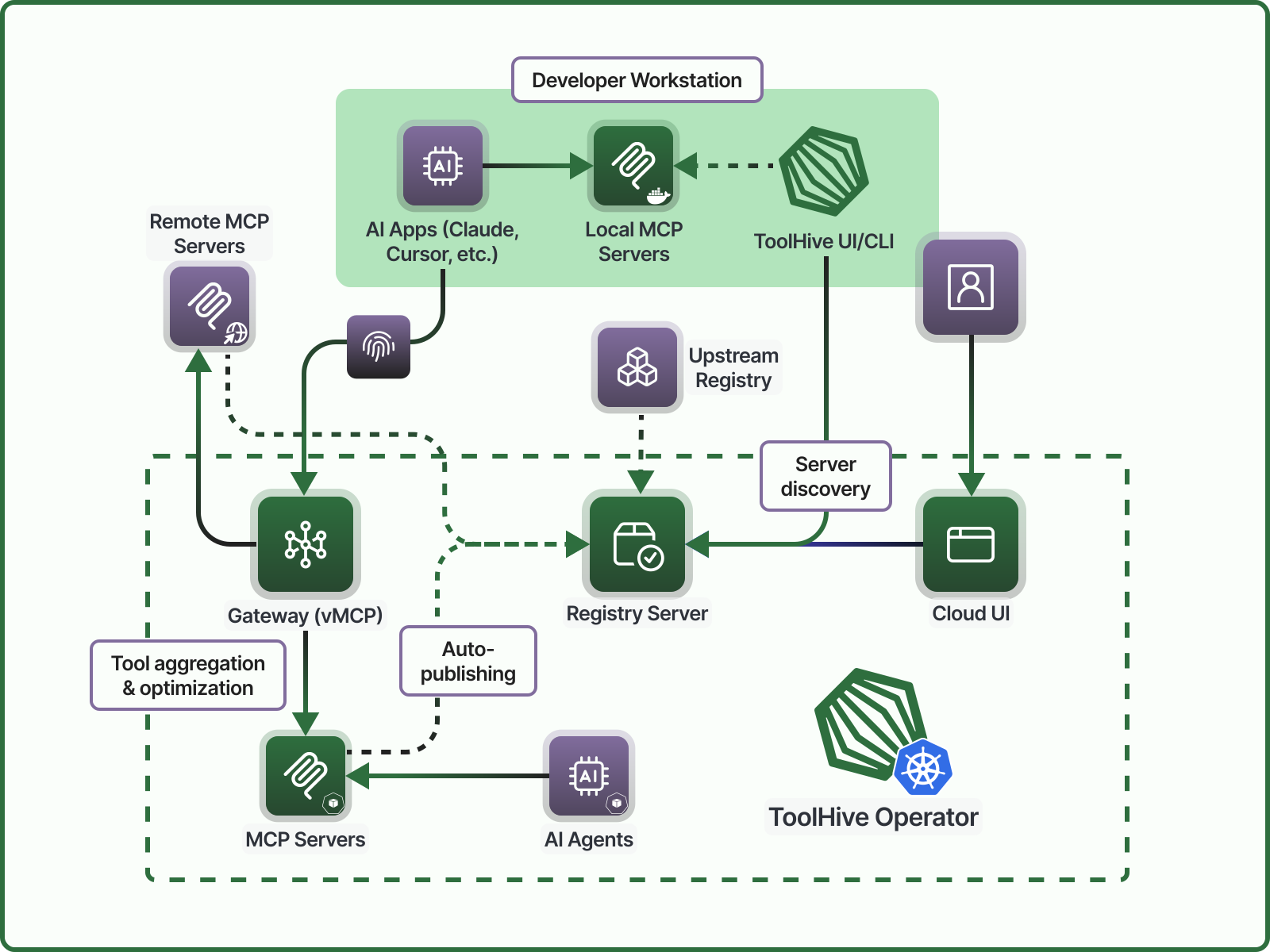

Runtime
The ToolHive Runtime is the core component that runs MCP servers in isolated containers. It provides a secure and scalable environment for deploying MCP servers, with features like fine-grained permissions, network access controls, and secret management.
The ToolHive Runtime is available in three different editions to suit different use cases:
-
ToolHive UI: A desktop application for individual developers to run and manage MCP servers locally. It provides a user-friendly interface to discover, deploy, and manage MCP servers.
-
ToolHive CLI: A command line interface to deploy and manage MCP servers on your local machine or in development environments. It allows quick deployment of MCP servers and supports advanced features like telemetry and fine-grained authorization policies.
-
ToolHive Kubernetes Operator: A Kubernetes operator for teams and enterprises to run and manage MCP servers in multi-user environments. It provides centralized management, security controls, and integration with existing infrastructure.
Registry Server
The ToolHive Registry Server is an implementation of the official MCP Registry API. Curate a catalog of trusted servers from multiple backend sources for users to quickly discover and deploy. It can be deployed standalone or as part of the ToolHive Operator.
Gateway
Implemented in the ToolHive Kubernetes Operator as the Virtual MCP Server (vMCP), the ToolHive Gateway is a secure proxy for MCP server connectivity, aggregation, and orchestration. It's available as part of the ToolHive Operator for Kubernetes deployments.
Portal
The ToolHive Portal is how users discover and install MCP servers. It's available as a cross-platform desktop app (the ToolHive UI) and an experimental web-based frontend to the ToolHive Registry Server.
Better together
ToolHive components work together to provide a seamless experience for both admins and users:
- Admins curate and organize MCP servers in the Registry, configuring access and policies.
- Users discover and request MCP servers from the Portal, and ToolHive orchestrates installation and access.
- Runtime securely deploys and manages MCP servers across local and cloud environments, integrating seamlessly with existing SDLC workflows, exporting analytics, and enforcing fine-grained access control.
- Gateway handles all inbound traffic, secures context and credentials, optimizes tool selection, and applies organizational policies.
Why ToolHive?
We want to help you get real value from MCP servers. While there are plenty of tools to help you quickly build MCP servers, the obstacles to using those servers effectively are largely operational. ToolHive addresses the runtime, security, and other considerations necessary to use MCP servers with confidence and in production.
We address those considerations with proven, familiar technologies like containers and Kubernetes.
ToolHive lets you run any MCP server, regardless of its underlying technology stack, even when the original authors didn't provide container images. We containerize the MCP server and let you use a simple CLI or Kubernetes to manage MCP deployments at any scale. Coordinate all your MCP servers from one place with sensible security controls and container-native simplicity.
Key features
ToolHive includes a range of capabilities to help you run and manage MCP servers effectively:
Runtime:
- Run local MCP servers instantly from the built-in registry of vetted MCP servers, any Docker container, or directly from package managers
- Deploy MCP servers in the cloud via Kubernetes for enterprise scalability
- Proxy remote MCP servers securely for unified management
- Apply fine-grained permissions and network access filtering
- Protect sensitive data with built-in secrets management and enterprise OAuth integrations
- Leverage OpenTelemetry and Prometheus for observability and audit logging
Registry Server:
- Curate a catalog of trusted MCP servers from multiple sources: the official MCP Registry, other public registries, and custom files
- Group servers based on role or use case
- Manage your registry with an API-driven interface
- Preset configurations and permissions for a frictionless user experience
Gateway:
- Orchestrate multiple tools with a deterministic workflow engine
- Centralize control of security policy, authentication, authorization, auditing, etc.
- Customize and filter tools and descriptions to improve performance and reduce token usage
Portal:
- Cross-platform desktop app and browser-based cloud UI
- Make it easy for end users to discover and deploy MCP servers
- Install MCP servers with a single click
- Connect with local clients like Claude Desktop, Cursor, VS Code, and many more
Additional resources
Join the Stacklok Discord community to connect with other ToolHive users, ask questions, and share your experiences.
Source code and issue tracking:
- ToolHive CLI & K8s Operator
- ToolHive UI
- ToolHive Registry Server
- ToolHive Cloud UI (experimental)